There is a few different ways that you can activate Windows 8.
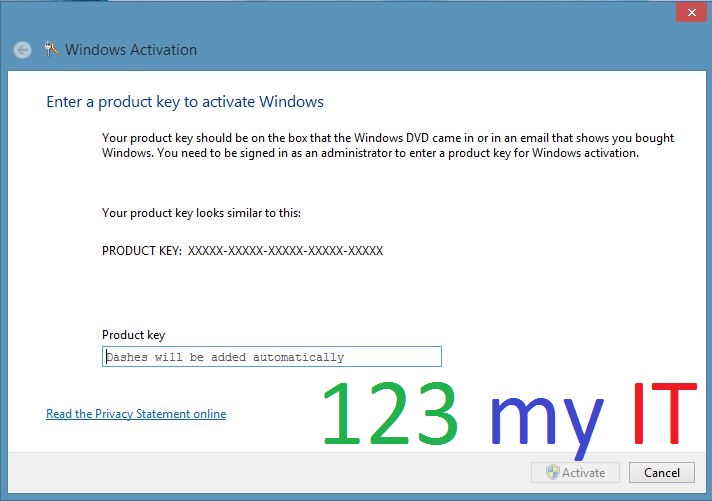
The first way is to do a search for Slui.exe 0x3. Run the Slui.exe 0x3 command in search and click the Slui.exe 0x3 icon.
Then type your product key in the Activation window then click on the Activate button.
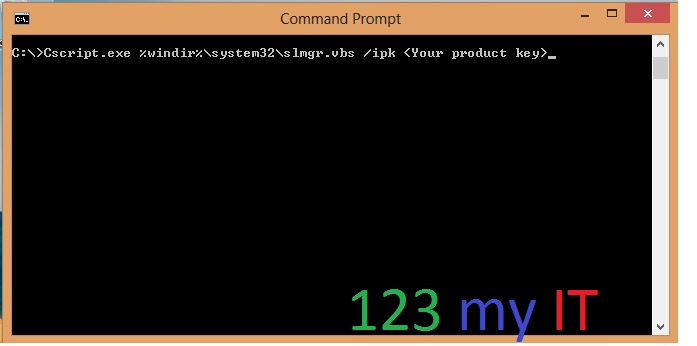
The second way is to run a command from the command prompt.
Make sure you are logged in as a Administrator then do the following.
In the search screen type CMD, which is short for command.
Press enter or click on the command prompt.
Then type the following command.
OSX has a Recovery function built in which allows you to repair disks or reinstall OS X without a DVD/ CD Rom. Some
of the new models such as the Macbook Air don’t have a DVD player. So how can you reinstall OS X without a DVD drive???
With the OS X Recovery Disk Assistant on a USB or external drive you can format the Macs hard drive and reinstall Lion or Mountain Lion. You can also repair the disk using Disk Utility, restore a backup from Time Machine or simply browse the internet with Safari.
Hi Guys
I have added a new iPhone firmware direct links page that should come in handy for those looking to use the original firmware on your iPhones. The links to the firmware are all direct links to Apple so you can be sure the firmware is legit.
You can find the page under the iPhone menu at the top of the page or you can find the page in the link below.
NOTE: If you have bricked the following models you can find the article on how to fix them here. Samsung Galaxy Nexus, GT-I9250, GT-I9100G, GT-I9300 and S3 GT-I9300
This video will show you how to get a Samsung Galaxy S phone out of black screen of death. The black screen of death can display in two forms. One a as a black screen with a little mobile phone ! and computer on it and the other as just a black screen with no light or anything on it.
At any rate the way to tell if you phone is totally broken is to first of all make sure you have enough battery.
To do this remove the back cover of your phone and reseat the battery so that you are sure the phone is getting power and that the battery has not just gone flat for because the contacts are not touching correctly. Then charge your phone and leaving it charging for a few hours.
If that doesn’t work, the next step is to try removing the sim card and storage cards remove the battery and leave them out for about 5 seconds. Replace only the battery and charge it again. If you still have no luck here but you are sure the battery is charging there is a way to test that its still alive.
If you are using Windows, Go to the start menu and right click Computer and open Device Manager, and plug your phone out of the USB port and plug it back in. If the device manager makes a noise or moves as if its installing a driver the chances are the device is still working.
Try putting your phone into Download mode by holding down Power, Home and the Volume down buttons. Hold these buttons down until you see the following screen.
Once you have it in download mode there is a good change you can reload the firmware. To do this you can following my video here.
If you want to know how to root the Samsung see the video here.
How to put a Samsung Galaxy S into download mode here.
This video will show you how to root a Samsung Galaxy S phone.
Step 1.Download and install the XXJVU firmware, the check what type of firmware you already have on your phone go to Settings and About Phone. If you want to know how to do this you can see the 123 my IT tutorial here.
Step 2.Download the CF-Root-XX_OXA_JVU_2.3.6-v4.3-CWM3RFS.zip from our downloads section here.
Step 3.Extract the CF-Root-XX_OXA_JVU_2.3.6-v4.3-CWM3RFS.zip and you will have the CF-Root-XX_OXA_JVU_2.3.6-v4.3-CWM3RFS.tar file.
Step 4.Download and run Odin software you can download it from our download page here.
Step 5. Turn off your mobile phone and wait 5 seconds for it to vibrate to make sure it is completely off.
Step 6.Put the Galaxy S in download mode by holding down the Volume Down plus Home Plus Power buttons all at the same time.
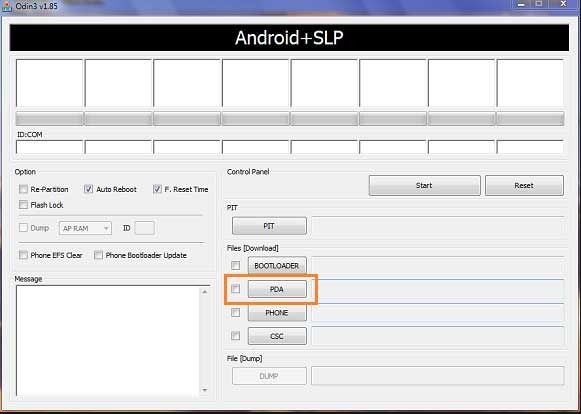
Step 7.In the Odin software select the PDA tab and then select the extracted CF-Root-XX_OXA_JVU_2.3.6-v4.3-CWM3RFS.tar file.
Step 8. Make sure you do not select the “Re-Partition” checkbox as this will brick your phone. Make sure that the “Auto Reboot” and “F. Reset Time” checkboxes are ticked.
Step 9.Click the start button in Odin to start the flash of the CF Root File.
Step 10.The phone should restart automatically when the CF Root file is installed. When Odin displays the Pass in green you can unplug the phone from the USB cable.
Step 11.Your phone should now be rooted ad you should see the CWM app and clockworkmod based recovery is installed.
Once this is done your Samsung Galaxy S should be rooted ! 🙂