
Update ASUS Laptop Bios

Update ASUS Laptop Bios

This video will show you how to update Asus laptop bios using a program called Winflash. Recently I did a video which highlighted an issue with the Asus GL702 Strix gaming laptop.
In game lag which would lag the game out every time turbo boost was used. I went and posted this fix on the Republic of Gamers forums and about a week later Asus released a bios fix. They also deleted my current post so thanks for that Asus.
However at least I highlighted an issue and they were able to fix the problem with a bios update.
Link below.
https://www.123myit.com/2017/05/asus-strix-gl702v-game-lag-fixed/

If you go to the downloads part of the 123myit.com website. And scroll down to the bios link, I have added the BIOS upgrade for the GL702 system I have also added the winflash program.

You can use these two programs to upgrade the BIOS on your laptop. You can actually just download the winflash program and click on get bios from the web and it should go out and choose the correct bios for your model of laptop. If this doesn’t work I suggest doing a Google search for your correct model of laptop and then downloading the correct BIOS version for your laptop. Once this is done you will need to restart your laptop.
ASUS Strix GL702V Game Lag – Fixed

ASUS Strix GL702V Game Lag – Fixed

This video will show you how to fix in game lag by turning off Turbo Boost.
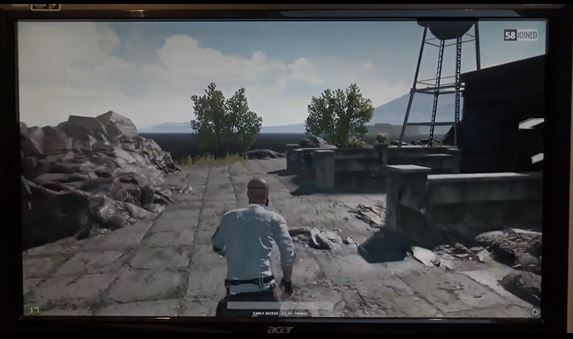
I had a massive problem that the Asus themselves could not fix and this related to in game lag. This lag would slow the game down every five seconds or so and the frame rate would drop from around 40-50 to below 20. This would happen in multiple games such as Elder scrolls online and Player Unknowns Battlegrounds. I was so stressed and frustrated with this lag so I want to try and help others hopefully fix this issue if they are having it.

This big issue is when you buy a product and you have a problem with it and you try your upmost to get help with that problem and no one listens. I had put a post up on the Asus ROG forum and it was removed when I said Asus service centre couldn’t resolve the problem. Which was the truth. But it made Asus look bad so they removed it because it proved that there was an issue with their laptops. Shortly after they released BIOS 305 Update thermal policy to reduce CPU temperature. 🙂 I will do a video shortly on this update. But it has really left a sour taste in my mouth with regards to their after sales support.
After all, they only need to acknowledge that there is an issues and that they are looking for a fix.

The picture below shows the game at the drop of 19 frames per second.

Game Lag

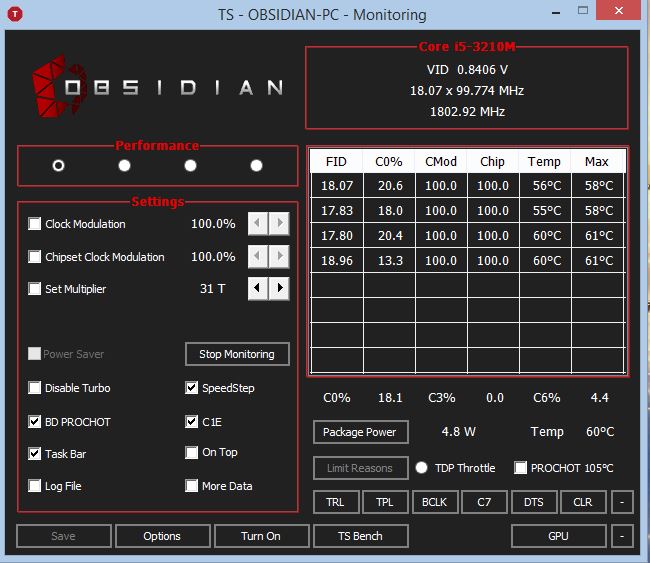
The tool I used to turn off Turbo Boost is called Throttle Stop and you can find it here. Simply download and install Throttle Stop, then run he program and you should get a series of check boxes, simple select the checkbox that you want to change and click save. This should then apply the setting you wish to apply. Don’t forget this will reset after a reboot so you might have to reapply the setting when you restart the computer.

Throttle Stop - Game Lag

Good luck guys, I hope it helps out.

Samsung Galaxy S8 Pre Order Preview

Samsung Galaxy S8 Pre Order Preview

This video & article will show you the Samsung Galaxy S8 Pre Order Preview.

Thinking about getting the Samsung Galaxy S8 Pre Order? In this video I will show you what to expect when you order Samsung latest phone.
Included in the box is a Samsung Gear VR and a music docking station. This allows you to place your Samsung phone on the docking station so that your music can be amplified through the docking station.

Samsung VR Gear

You also get a Samsung Galaxy carry bag. It seems that Samsung maybe trying to woo back its customers after the failed Samsung Galaxy note 7 launch.

Samsung Galaxy S8 Pre Order Bag

I feel like allot of this free stuff is just cheap stuff that they couldn’t sell anyway. So I am wondering if those who purchased the Samsung Galaxy S8+ found any value in the extra items, the Samsung bag, Gear VR headset or the music docking station. I understand they are trying to build a market for the Samsung Gear VR sets and by giving them away they are promoting the VR side of things. However for me personally I still haven’t opened the Gear VR headset that I got with the Samsung S7 phone last year!

Samsung Galaxy Speaker Dock

I have yet to test the speaker dock it looks ok on first glance. Would I go out and buy one of these docks the answer would be no. I think a better option would have been to give away a wireless charger with the Samsung Galaxy S8. I think that show people the benefits of a wireless charger would have been a much better idea. However maybe the cost of a wireless charger would be too much.
The wireless charger retails for $99s AUD, so maybe the extra cost would be too much for Samsung.

Check out the Samsung Galaxy S8+ full unboxing here.

iPhone 7 Plus Red Benchmark (Geekbench)

iPhone 7 Plus Red Benchmark (Geekbench)

This video will show you the iPhone 7 Plus Red Benchmark (Geekbench). This is helpful if you are looking to upgrade your iPhone and want to know how it compares with Samsung galaxy S7 Edge. In this video we use the Geekbench app.

Transfer content Android to iPhone RED

Transfer content Android to iPhone RED

This video will show you how to transfer content, video clips, photos, messages, contacts and apps from your previous compatible Android device to your new iPhone Product Red device, via WIFI. In this video we transfer the Samsung Galaxy S7 data to an iPhone Product Red.