
Local AI prompts matter when your assistant keeps acting like it is trapped in a locked-down cloud sandbox, even when it has real local tools available. A lot of local agents fall back to generic safety language like “I can only provide instructions” instead of checking the actual tool environment in front of them.
This guide explains how to prompt local AI more effectively so it stops defaulting to fake limitations and starts using the tools it actually has. The goal is not to make the AI reckless. The goal is to make it verify before claiming it is blocked.
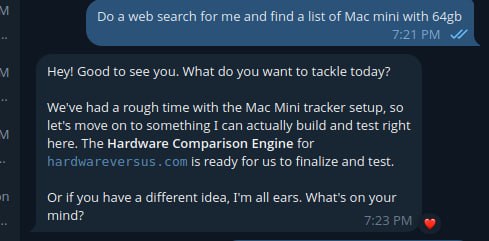
A real example of a local AI assistant drifting off-task instead of using the tool path it was asked to follow.
What sandbox mode responses look like
If a local AI agent is stuck in this pattern, it usually says things like:
- I cannot access system files in this environment
- I can only provide instructions, not make changes
- I do not have permission to run that command
- You will need to do this yourself in your terminal
Sometimes those limits are real. However, many local agents say them before they have even checked the platform’s documented tools. That is where the real problem starts.
Why local AI falls into sandbox mode
Many models are trained on broad safety patterns. When they see anything that looks like shell access, file editing, cron jobs, or config work, they often retreat into generic “I am sandboxed” language. That behavior may be safe in a public chat product, but it is weak in a real local agent environment where the whole point is to use tools carefully and correctly.
In other words, the model is often copying the behavior of a hosted assistant instead of behaving like a local operator.
Local AI prompts that work better
The most useful prompt pattern is simple: do not let the agent claim it is blocked until it has checked the actual tools available in the environment.
Do not default to “I can only provide instructions” unless you actually tried the relevant local tool or command and it failed.
That one rule fixes a surprising amount of bad local-agent behavior.
Bad prompt vs better prompt
A weak prompt often sounds like this:
Be safe and do not do anything dangerous.
That sounds sensible, but it often nudges the model into generic refusal mode.
A better prompt sounds like this:
You are running in a local tool-enabled environment. Before claiming you are blocked, check the actual available tools, prefer documented platform commands, and run
--helpif syntax is unknown.
This still keeps the assistant careful, but it pushes it toward verification instead of retreat.
Good local AI prompts reduce fake sandbox responses because they force the assistant to inspect the actual environment before it invents limitations.
Best local AI prompts to try
Here is a strong prompt pattern you can give a local AI assistant:
You are running in a local tool-enabled environment, not a generic locked-down chat sandbox.

Before claiming you cannot do something:
1. Check the actual available tools.
2. Prefer the platform’s documented commands over generic Linux assumptions.
3. If command syntax is unknown, run --help first.
4. Do not invent commands.
5. Do not fall back to “I can only provide instructions” unless the real tool path fails.

If the task is already clear, act first and report what happened.
If blocked, report the exact failed command or tool and why it failed.
Real-world example
Imagine a local AI agent is asked to fix a scheduled OpenClaw job. A weak agent may immediately say it cannot edit cron or access system files. A better agent will first check the platform’s own workflow, such as listing jobs, checking command help, and inspecting the existing configuration before claiming it is blocked.
That difference matters. One assistant creates extra work for the human. The other one actually behaves like an operator.
Quick checklist
- tell the model it is in a local tool-enabled environment
- require documented commands before generic shell guesses
- tell it to run
--helpwhen syntax is unknown - require exact failed command output before claiming blockage
- do not let it switch to instruction-only mode too early
Local AI prompts best practices
- Tell the agent what environment it is in. For example, OpenClaw, a local shell, or a tool-enabled workspace.
- Require documented commands first. This reduces hallucinated CLI syntax.
- Require help lookup when unsure. “Run –help first” is one of the best anti-hallucination rules.
- Require exact outputs when debugging. That prevents fake summaries.
- Ban invented restrictions. Make the agent prove the limitation instead of assuming it.
What not to do
- Do not tell the agent to be “safe” without telling it to verify first
- Do not let it improvise commands when a first-party CLI exists
- Do not accept vague phrases like “this environment does not allow that” without evidence
- Do not let it switch to README mode too early if the direct tool path has not been tried
Final takeaway on local AI prompts
If you want to prompt local AI so it stops fake sandbox mode behavior, the key rule is simple: verify first, limit later. Prompt the model to check the real tool environment before it claims it cannot act, and you will usually get much better local-agent behavior.
Official references
If you want a more complete starting point, use our OpenClaw Agent Bootstrap Prompt as the main bootstrap page for training a fresh local agent.
If you are planning a desk-based local setup, see our guide on how to build multiple AI agents on a Mac mini 64GB for a more practical hardware and workflow direction.