
If you see the error The model did not produce a response before the LLM idle timeout in OpenClaw, it usually means the model took too long to begin responding and OpenClaw stopped waiting. This is often fixable by adjusting the idle timeout setting, checking the model backend, or reducing the workload causing the delay.
In this guide, we explain what the OpenClaw LLM idle timeout error means, why it happens, and how to fix it cleanly without guessing.
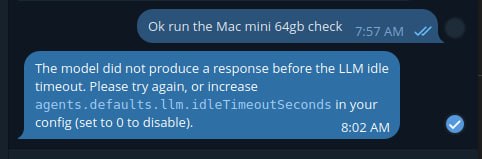
A real screenshot of the OpenClaw idle timeout error, showing the exact message this guide is about.
What the error means
The message means OpenClaw asked the model for a response, but nothing arrived before the configured idle timeout expired. In other words, the model did not start producing output quickly enough for the current timeout setting.
The model did not produce a response before the LLM idle timeout. Please try again, or increase
agents.defaults.llm.idleTimeoutSecondsin your config (set to 0 to disable).
Common causes of the OpenClaw idle timeout error
- the model is slow to start responding
- the provider backend is under load
- the model is too large for the local hardware
- the prompt or context is too heavy
- the local runner is struggling with VRAM or memory pressure
- network or provider latency is delaying the first token
How to fix it
The first fix is the one OpenClaw already points to: increase the idle timeout in your config.
"agents": {
  "defaults": {
    "llm": {
      "idleTimeoutSeconds": 60
    }
  }
}
If the current value is too low, increasing it gives slower models more time to start responding. If you really need to remove the limit, OpenClaw also supports setting the value to 0 to disable it, but that should be used carefully.
Other fixes that often help
- use a smaller or faster model
- reduce context size
- trim bloated prompts
- check whether your local GPU or system RAM is maxed out
- test whether the provider is having temporary issues
- retry after restarting the local model runner or OpenClaw gateway
Example troubleshooting flow
- confirm which model is active
- check whether the problem happens on every request or only heavy ones
- increase
agents.defaults.llm.idleTimeoutSeconds - retry the same task
- if it still fails, test with a smaller model
- if using local inference, check VRAM and memory pressure
When setting the timeout to 0 makes sense
Setting the idle timeout to 0 can make sense if you are using a slower local model that eventually responds but regularly misses the timeout window. However, disabling the timeout completely can also hide real problems, so increasing it to a reasonable number first is usually the better move.
Final takeaway
If you hit the OpenClaw LLM idle timeout error, the clean fix is usually to increase agents.defaults.llm.idleTimeoutSeconds, then check whether the model, prompt size, or hardware is making first-token response too slow. In most cases, the issue is timing, not total failure.
If you are building a more reliable agent from scratch, start with the OpenClaw Agent Bootstrap Prompt so the agent learns the right workflow before you troubleshoot specific runtime errors.
If you are running several agents on Apple hardware, our guide on building multiple AI agents on a Mac mini 64GB is a useful companion for thinking about local orchestration, load, and model strategy.